Showing posts with label Windows 8. Show all posts

Windows 8 leaked on the Internet


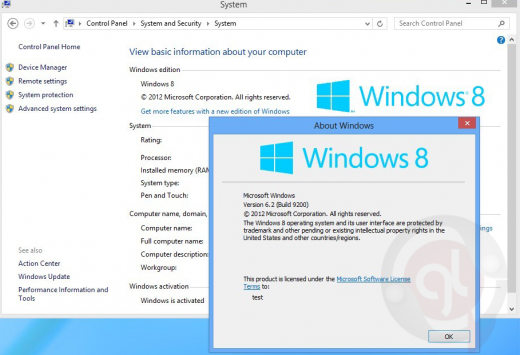
Just a day ago Microsoft announced the "Released to manufacturing" (RTM) milestone for Windows 8 and today it got leaked on internet, available for everybody to download freely. The RTM version is when the product development and testing is completed and final code is handed over to company's OEM partners for manufacturing, using this FINAL version OEM's will begin preparing there offerings of Windows 8 PCs and devices.

This "FINAL VERSION" of Windows 8 is out now in public on Bittorrent portals and file-hosting websites for download, the leaked version is "Enterprise N X64 edition" does not feature the Windows Media Player component. Since, this is the original version without any "Windows 8 key or crack" and this will expire within 30 days on installation. The details of leak are as follows :

MICROSOFT.WINDOWS.8.ENTERPRISE.N.RTM.X64.VOLUME.ENGLISH.BOOTABLE_ISO-CTRLSOFT
FILE: W8EntN.x64.RTM.EN-CtrlSoft.iso
SIZE: 3,168,436,224 bytes
CRC-32: 3B2EDC62
MD5: A5A2E1AF1A48D3655C08F384D7408F83
SHA-1: EA02303283F24EB1942D39B1272D2F07B18B4645
NOTE: Original files NON-boot DVD M$ distributive by WZT.
Bootable ISO by CtrlSoft.
"ENTERPRISE-N" version Windows 8 not include Windows Media Player.
08-03-12

Windows 8 RTM

Here is the official Microsoft Windows 8 availability schedule :
People will be able get Windows 8 starting on October 26th either by upgrading for $39.99 or on a new PC or device. And if you buy an eligible Windows 7 PC today, you will be able to purchase an upgrade to Windows 8 Pro for $14.99 (U.S.) through the Windows Upgrade Offer.
However, we have a number of programs that provides various audiences early access to the Windows 8 RTM code to help prepare for Windows 8 as it enters the marketplace this fall:
August 15th: Developers will be able to download the final version of Windows 8 via your MSDN subscriptions.
August 15th: IT professionals testing Windows 8 in organizations will be able to access the final version of Windows 8 through your TechNet subscriptions.
August 16th: Customers with existing Microsoft Software Assurance for Windows will be able to download Windows 8 Enterprise edition through the Volume License Service Center (VLSC), allowing you to test, pilot and begin adopting Windows 8 Enterprise within your organization.
August 16th: Microsoft Partner Network members will have access to Windows 8.
August 20th: Microsoft Action Pack Providers (MAPS) receive access to Windows 8.
September 1st: Volume License customers without Software Assurance will be able to purchase Windows 8 through Microsoft Volume License Resellers.
Note : This post is for news purpose only, do not post download links to illegal content as they wont make past the moderation process.


Things to Remember before Downloading the Windows 8 Consumer Preview


Hey guys, let me get you directly to the point. If you’re planning to download the Consumer Preview version of Windows 8, I think it would be helpful if you should read these some reminders first before you start.

First, this is a pre-release operating system. The Windows 8 Consumer Preview is just a preview of what has to come (the original). It represents a work in progress, and some things will change before the final release. Don’t expect it to be perfect as what you’ve imagine. You might encounter some hiccups and bugs and if you do, you can put your comments and reactions through telemetry, forums, and blog posts so that they (Microsoft) can smooth out some of the rough edges.

Second, you should be comfortable with new technology
If you’re fun of running  a pre-release (beta) software, then I assume that you’ve already got an idea of this troubleshooting thing and you don’t mind doing a few technical tasks, then you’ll probably be OK giving the Windows 8 Consumer Preview a try. As with pre-release software in general, there won’t be official support for the Windows 8 Consumer Preview, but if you have problems, you can share it to them through a blog post .Windows website has information that could help you out and make the Windows 8 experience more productive and enjoyable.
And finally, you should have the right hardware requirements
Windows 8 Consumer Preview should run on the same hardware that powers Windows 7 today.The following requirements are needed when running a Windows 8 Consumer Preview in a PC:
  • 1 GHz or faster processor
  • 1 GB RAM (32-bit) or 2 GB RAM (64-bit)
  • 16 GB available hard disk space (32-bit) or 20 GB (64-bit)
  • DirectX 9 graphics device with WDDM 1.0 or higher driver
  • 1024 x 768 minimum screen resolution
However,an additional requirements are needed to consider. In order to use the Snap feature, you will need a PC with a 1366×768 resolution or higher. If you want to use touch, you’ll need a multitouch-capable laptop, tablet, or display. Windows 8 supports up to five simultaneous touch points, so if your hardware doesn’t, you may find typing on the onscreen keyboard and using certain controls more of a challenge. You’ll also need an Internet connection to try out the Windows Store, to download and install apps, and to take your settings and files with you from one Windows 8 PC to another.


Windows 8 Consumer Preview ISO images Direct Official Download Links


Microsoft has finally unveiled public download links to the much awaited Windows 8 Consumer Preview build. Now available both as automated web-installer and full ISO disc images in various languages with accompanying genuine Windows 8 activation serial product keys, the direct download links and introduction video are posted after the jump. 

Windows 8 Consumer Preview


Related Posts Plugin for WordPress, Blogger...

Entertainment

News

Sports